Live integration
CareNotes + Open Dental
CareNotes reads today’s schedule from Open Dental and, after you review and sign, uploads the clinical note and the structured perio chart into the patient’s record. Open Dental connects through its own API, so there is nothing to install.
 App
 Practice software
What works with Open Dental
The schedule comes in. The signed note goes back. Premium
Everything below reads from, or writes to, the Open Dental system your office already runs. Nothing to re-enter, nothing to export.
Schedule on Home
Every patient on the Open Dental schedule, with procedure and provider. Tap one and start recording; no patient lookup.
Morning Huddle and CareAssist
A per-patient brief and a pre-visit summary from prior notes and the Open Dental record. Morning Huddle
Note into the chart
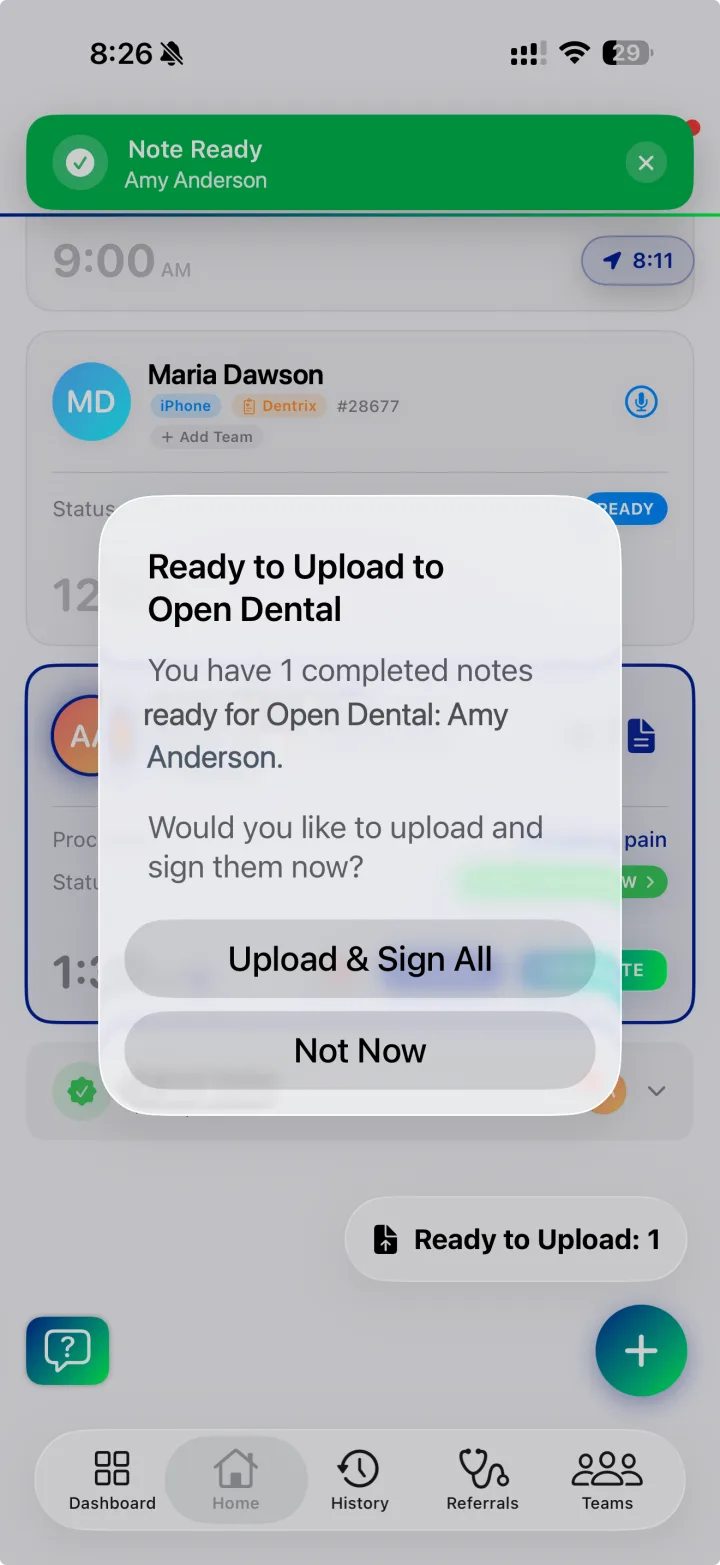
Review on the phone, tap Ready to Upload, and the note is written to the patient selected from the schedule.
Structured perio upload
Pockets, bleeding on probing, recession, mobility, and furcation, spoken or tapped, upload into the Open Dental perio chart. Voice perio
Back into the chart
Sign on the phone. It lands in Open Dental.
Record the visit, review the AI dental note, and send it to the chart before you reach the next room.
From the operatory to the Open Dental record
Start recording on iPhone, iPad, Apple Watch, Android, or the operatory computer. Speech-to-text runs on the device, and 117+ procedure-specific agents draft the note in your template. You review, edit by typing or speaking, and sign.
- Nothing is uploaded until you sign and confirm. Home shows a Ready to Upload badge for each signed note.
- The note goes to the patient you picked from the Open Dental schedule, so it never lands on the wrong chart.
- Voice perio charts upload into the structured Open Dental perio chart, not only as a paragraph. About voice perio
- Prefer to paste? Every note is also at carenotes.ai/notes, ready to copy into Open Dental on any plan.
How setup works
Connect Open Dental once, for the whole office.
One person links the location. Everyone else just opens the app.
Link in the app
In CareNotes, open Settings → Dental Software, choose Open Dental, and set the toggle to Linked. Premium payment has to be completed.
Request the key
When the status reads Payment Completed, tap Request CareNotes Premium Key. Step by step
Get the API code
CareNotes emails a Welcome to CareNotes Premium message with your API code, within one business day.
Paste it in Open Dental
In Open Dental: Setup → Advanced Setup → API, tick Enabled, click Add Key, paste the code, and Save. Picture guide
Before you start: CareNotes Premium with payment completed, the CareNotes app updated on iPhone, and someone who can open Setup → Advanced Setup → API in Open Dental. No server, no Agent, no download.
Already a member? Settings → Dental Software. Questions: info@cnotes.ai
Plans
Start free. Premium puts it in the Open Dental chart.
One price per location, with unlimited users. Cost does not grow as the team grows.
- Record the visit and get the AI dental note
- On-device transcription, editing, history, custom templates
- Apple Watch
- Copy and paste into Open Dental from carenotes.ai/notes
- Schedule sync from Open Dental, today and tomorrow
- Signed note upload into the Open Dental chart
- Structured perio upload into Open Dental
- Morning Huddle, CareAssist, additional languages
No contract, month to month, cancel anytime. Founding monthly rate locked for the first 1,000 offices while the subscription stays active. Pricing · Trust Center · Technical specifications
Questions
CareNotes and Open Dental
Do I install anything for Open Dental?
No. Open Dental connects through its built-in API. You request a key in the CareNotes app, we email an API code, and you paste it into Open Dental under Setup, Advanced Setup, API.
What goes into the Open Dental chart?
The clinical note you reviewed and signed, uploaded to the patient selected from the schedule, and the structured perio chart (pockets, bleeding on probing, recession, mobility, furcation) from voice perio charting.
Which schedule does CareNotes see?
Today’s and tomorrow’s appointments from Open Dental, so Home lists who is next and the Morning Huddle for tomorrow is ready the evening before.
Can I use CareNotes with Open Dental on the free plan?
Yes. Record the visit, get the AI dental note, and copy it from carenotes.ai/notes into Open Dental. Upload, schedule sync, Morning Huddle, and CareAssist come with Premium.
How long does setup take?
The API code is emailed within one business day of the key request. Pasting it into Open Dental takes about five minutes.
Also supported
Same app, other practice software.


Get started
Start free. Link Open Dental when you’re ready.
Download CareNotes and write your first AI dental note today. Turn on Premium and link Open Dental from Settings when you want it in the chart.